Manage
Other Huawei models
How FengSui works on Huawei routers other than the H168-383: read-only by default, enabling experimental writes per feature, and reporting compatibility.
FengSui is verified on the H168-383 (firmware 4.4.0.1) only. Other Huawei HiLink / EMUI routers generally connect as well, but no one has verified them, so writes to them are locked by default: FengSui reads metrics only and does not change router settings.
| Model | Firmware | Reads | Writes |
|---|---|---|---|
| H168-383 | 4.4.0.1(H1006SP19C00) | ✅ verified | ✅ verified |
| H168-383 | another build | ✅ as usual, with a FIRMWARE_UNVERIFIED warning | ✅ as usual, with the same warning |
| Other Huawei HiLink / EMUI models | every build | ⚠️ may work, not verified: what the router provides | 🔒 locked by default; experimental writes per feature, after consent |
Huawei updates router firmware automatically. When your H168-383 receives a new firmware build, FengSui continues to function normally and emits a one-time FIRMWARE_UNVERIFIED notice.
How FengSui detects your router
After startup, and whenever you test or save a connection in "Settings → Router", FengSui reads the model, authentication scheme, and supported features once (read-only, without altering settings). The results appear in "Settings → Device".
FengSui determines the authentication scheme before sending credentials (SCRAM for newer models, SHA-256 or Base64 for legacy models). It never retries the same password with alternative schemes, avoiding accidental consumption of router login attempts.
What read-only means
- What you can see: Signal metrics, data usage, connected devices, and SMS messages reported by the router. Items that the router does not provide or that FengSui cannot parse are labeled "Not on this model", leaving other metrics unaffected. Models without 5G do not display 5G values.
- What is blocked: All write operations. The web interface, API, MCP, Telegram, and self-healing cannot bypass this barrier. The router receives no write requests, and endpoints return
409 DEVICE_UNVERIFIED_READ_ONLY. The header displays "Unverified model · read-only".
Experimental writes (risky, disabled by default)
For operations with dependable protocol documentation, FengSui provides generic implementations that you can enable individually:
- Band locking (4G only, using bands reported by the router)
- Reboot
- Reconnect
- Mobile data switch
- SMS (send, mark as read, delete)
Cell locking, security switches, Wi-Fi 7, antenna selection, and access control are not supported yet.
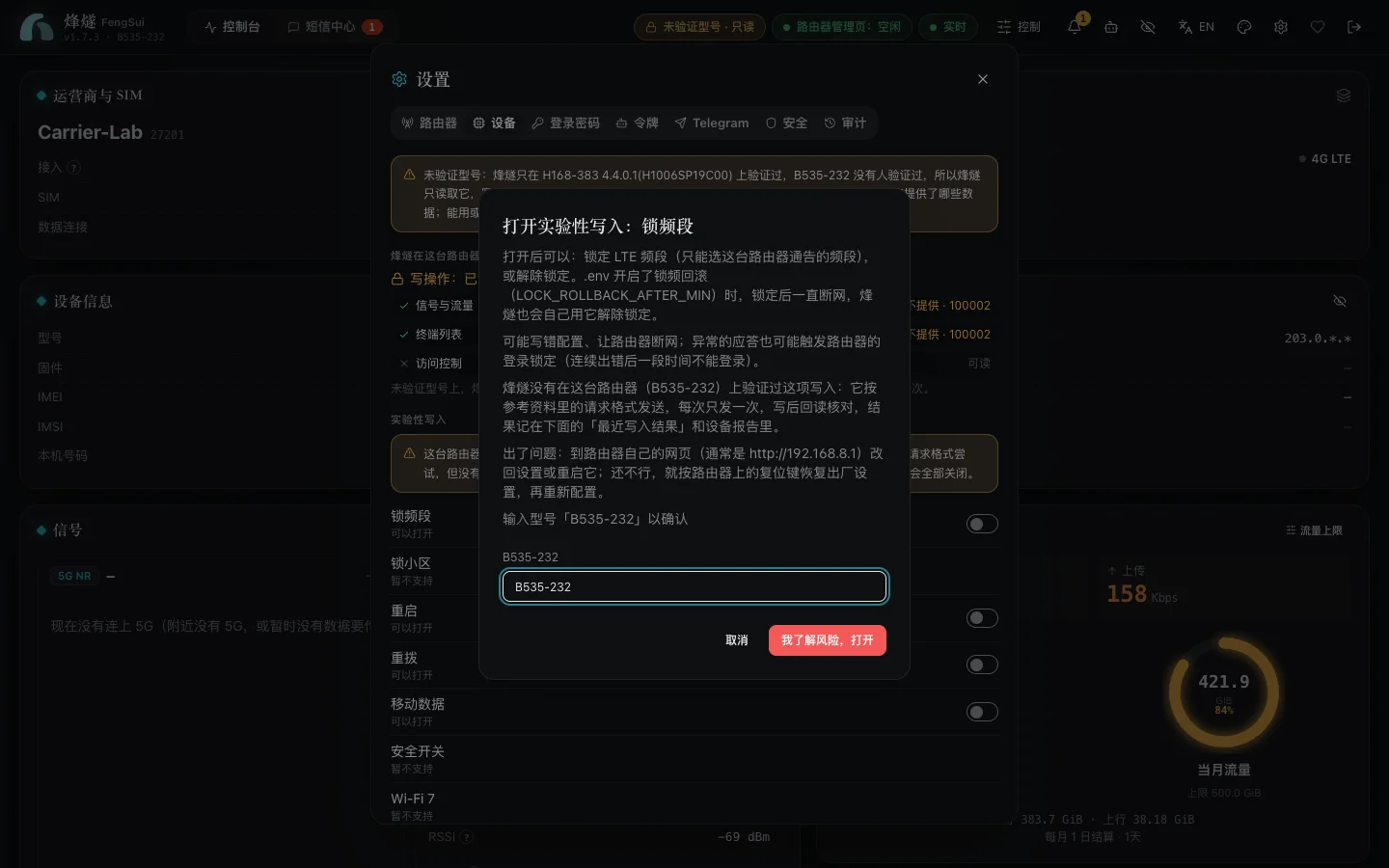
How to enable: Go to "Settings → Device" under "Experimental writes" to enable eligible items. Before enabling an item, a dialog explains which operations will be permitted and details the risks (writing incorrect configurations, losing internet connectivity, or triggering router login lockouts from unexpected responses). You must type the router model to confirm. Consent applies only to this specific model; switching to another router invalidates all prior consents automatically. Every activation and deactivation is recorded in the audit log.
After enabling: Only that specific feature is unlocked. Each write is sent once without retries, followed immediately by a read-back check that displays "read back: matches" or "differs". A mismatch raises a WRITE_READBACK_MISMATCH alert.
If issues occur: Open the router's own web page (typically http://192.168.8.1) to revert settings or restart, and use the physical reset button to restore factory settings if necessary.
Report compatibility
Your feedback helps verify more router models:
- Under "Settings → Device", click "Create device report", review the contents, and copy or download the JSON.
- Click "Report on GitHub", open a new issue, paste the report, and note which features work and which do not.
The report contains only API structures and safe metadata (model, firmware, web interface version, feature toggles, and band numbers). It excludes IMEI, IMSI, MAC addresses, IP addresses, phone numbers, cell identifiers, and Wi-Fi network names. FengSui never uploads anything automatically.
Once someone confirms and reports that a feature works on physical hardware, maintainers add it to VERIFIED_FEATURES in the codebase. The compatibility table gains a verified row, and that feature no longer requires individual consent on that model.
Try it first
DEMO_SCENARIO=unverified npm run demo simulates an unverified Huawei router (4G only, legacy login). You can use it to test read-only mode, consent flows, writes, and reporting workflows.
Acknowledgments
Thanks to Salamek/huawei-lte-api: when building compatibility for other Huawei models, FengSui referenced its API and model research. FengSui does not contain its code or depend on it.